Creative agencies are built on flexible talent. They lean on freelancers and contractors for motion, 3D, specialist channels, language variants, and the kind of narrow expertise that doesn’t always justify permanent headcount. This flexibility is commercially useful, but it can collide with best practice access and identity models which tend to have been designed for a smaller, more stable, and mostly in-house teams.
From a technology and security perspective, the problem arises from external collaborators being given broader access than they really need because the project has to move. Internal and external identities are not clearly separated, and offboarding happens late (or not at all) and, over time, agencies end up with a surprising number of outside accounts that can still see client work, internal discussions, and old asset libraries.
That is the problem this article addresses. It looks at how IT and technical leaders in creative agencies, working with managed partners such as Cardonet, can make freelancer onboarding faster, cleaner, and easier to control.
Why freelancer access becomes messy so quickly
Agencies do not bring in freelancers for the fun of it. They do it because the model works.
In practice, external talent usually brings three things:
- Specialist, project-related skills that it makes no sense to keep on payroll full time.
- Extra capacity for when deadlines bunch up and internal teams are already stretched.
- Fresh thinking on live projects without the cost of building a bigger permanent team.
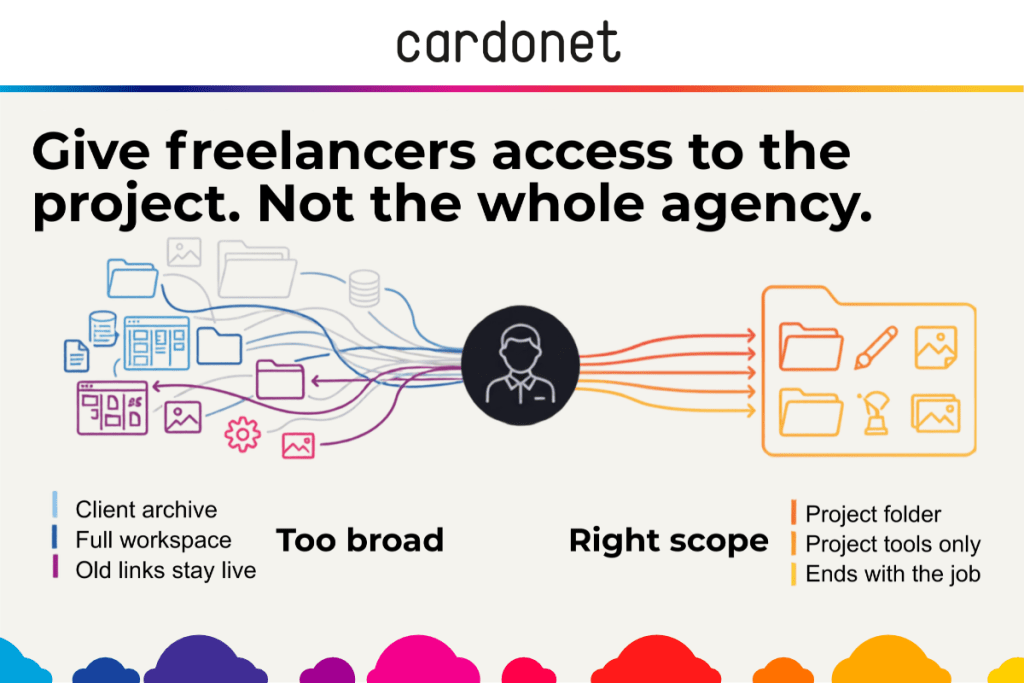
If the access model never catches up with that reality you wind up with freelancers who only need one folder but get the whole client directory and people who may need to only comment in one tool being added to an entire workspace. Then, when the project ends and everybody moves on, the account stays live because nobody wants to break anything.
This is a design, not a trust, issue. Creative agencies must be able to give freelancers everything they need to do the work, while making it difficult to see, download, or carry off anything else.
Treat freelancer onboarding as external from the start
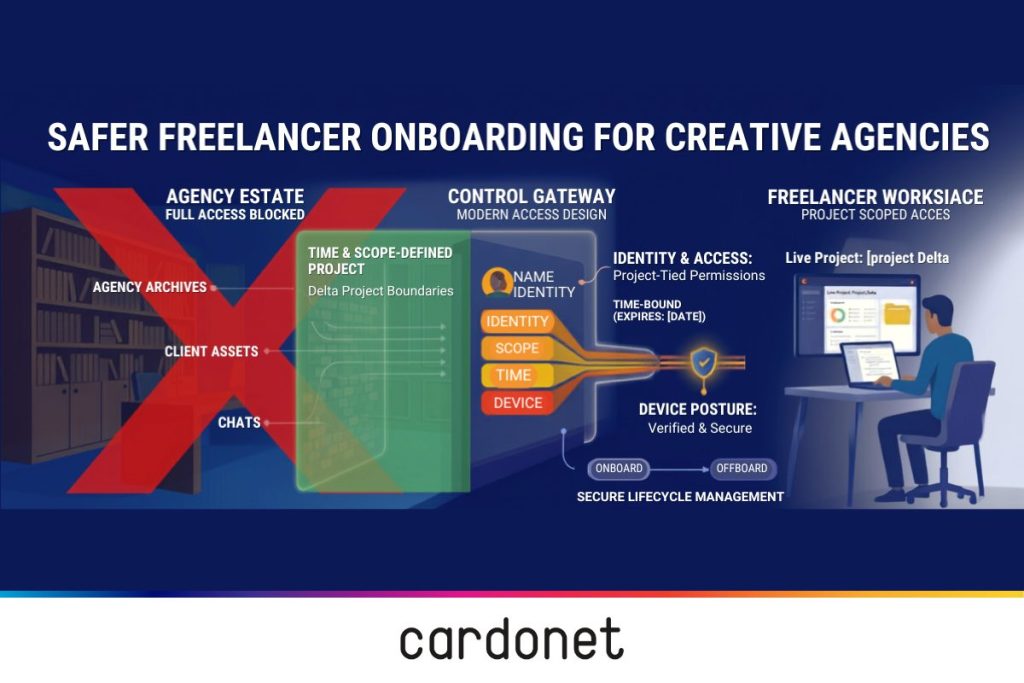
The first step is to stop treating freelancers as “almost staff”. In system terms, they are not. They are external users, joining for a defined period, to work on a set piece of activity. That distinction has to be reflected in the identity model from day one.
In practical terms, that usually means relying on guest and external user capabilities rather than handing out full employee identities by default. In platforms built around Microsoft Entra ID Business-to-Business access, or equivalent external-user models elsewhere, it becomes much easier to separate permanent staff from outside collaborators and apply different policies to each.
It also helps to be honest about where things usually go wrong. In most agencies, it is some combination of the following:
- A freelancer is set up as a full internal user because it is quicker.
- Access is granted at client or workspace level because nobody wants to be the bottleneck.
- When the job finishes, the account and old sharing links are left in place “just in case”.
Once those habits creep in, the access model stops being an access model at all. It becomes a collection of exceptions.
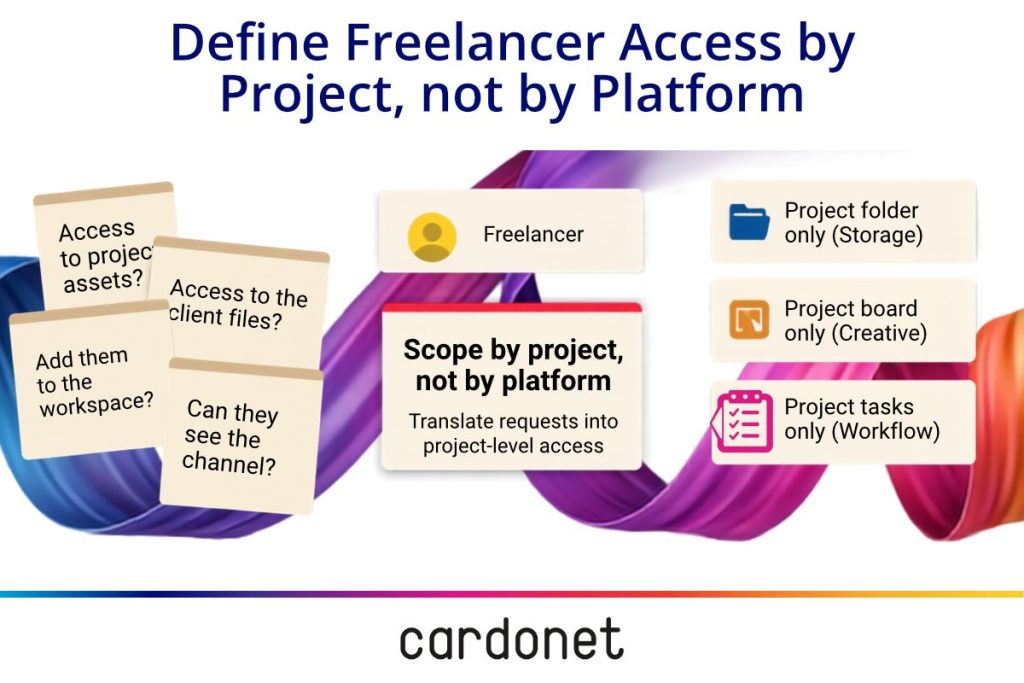
Define freelancer access by project, not by platform
A lot of requests come through in the wrong language. People ask for “access to Figma” or “access to the client files” when what they really mean is access to a very specific part of a project.
That is a useful distinction for technical leaders. The question is not whether someone needs the tool but rather what parts of the tool they need, and what they should be allowed to do there.
In practice, that means setting things up so freelancers work inside clearly bounded containers:
- In Google Drive, Microsoft SharePoint, or Dropbox Business, that might be a project-specific external folder rather than the full client archive.
- In Adobe Creative Cloud, Figma, or Frame.io, it usually means access to a project or team, not the whole estate.
- In Asana, ClickUp, or Jira, it means seeing the brief, tasks, and comments for the work in hand, not the wider operational machinery around it.
That sounds obvious, but it makes a real difference. Once “project-scoped access” becomes the default, onboarding gets quicker because fewer decisions are made from scratch.
The best setups rely on patterns, not heroics
Most agencies have at least one person who knows how to sort access out quickly. The problem is that this does not scale well. It relies on memory, goodwill, and someone being around when the request lands.
A stronger model is to turn common access decisions into repeatable patterns. A freelancer added to the right group should automatically inherit the right folders, channels, and project permissions. A simple Information Technology Service Management (ITSM) request should capture who they are, which client they are joining, what they need, and when that access should end. From there, either automation or a disciplined runbook should take over.
This is where a specialist provider such as Cardonet’s marketing agency IT support team can genuinely help. The value is not just speed. It is consistency. Agencies are far safer when access is provisioned in the same controlled way every time, rather than being negotiated afresh in email or chat each time anyone comes on board.
Device policy matters more than many agencies think
Freelancer access is not only about accounts. It is also about the laptops and desktops those accounts are being used from.
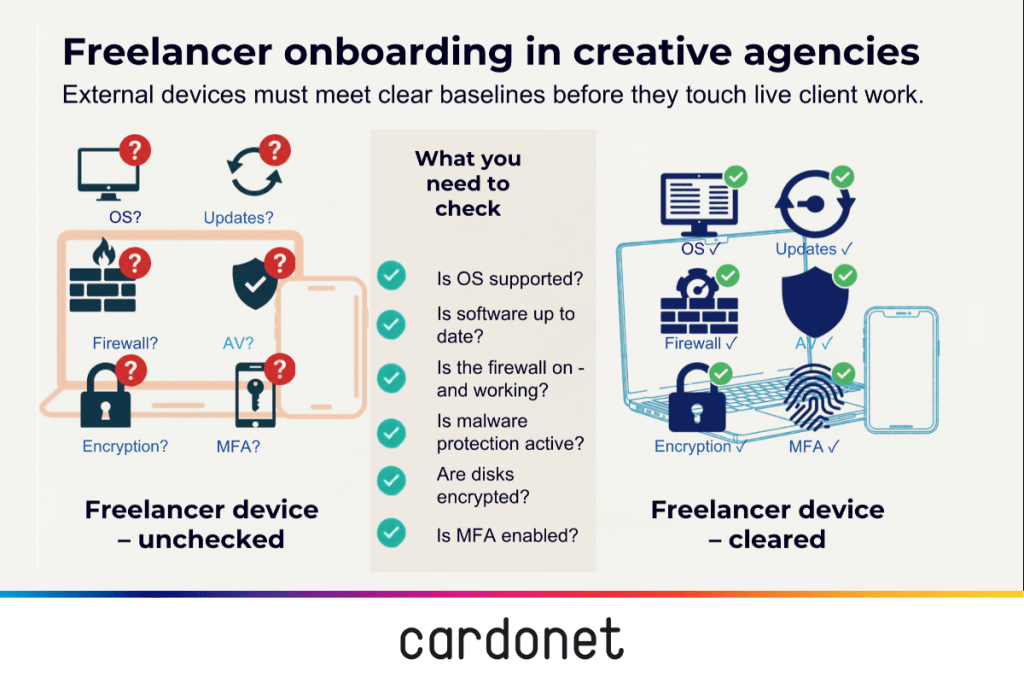
In many creative agencies, the assumption is that freelancers will use their own Apple MacBooks or Windows machines. That can work perfectly well, but only if there is a clear decision about what those devices need to look like before they are allowed anywhere near live client work.
The risk is not theoretical. Cybersecurity industry coverage of third-party breaches, such as the Okta incident via a contractor’s laptop, shows how outsourced or third-party access can become the route into a much larger environment, even where the organisation itself has strong internal controls.
In Okta’s 2022 incident, attackers gained remote access to a laptop used by a customer support engineer working for Sitel, one of Okta’s third-party providers. Okta later said the compromise affected a subset of customers, with up to 366 potentially impacted, while also maintaining that the core Okta service itself had not been directly breached. It became a well-known example of third-party risk because the route in was a contractor-connected device with operational access, not a dramatic failure at the centre of the platform itself.
That is why agencies need a device stance, not just an access stance.
In practice, that usually comes down to three workable options:
- Agency-issued devices for the most sensitive or long-running work.
- Personal devices allowed, but only where there is a clear baseline around operating system support, encryption, patching, endpoint protection, and user authentication. Guidance from IASME on working with contractors points to exactly these kinds of controls.
- Virtual or browser-isolated environments for higher-risk client work, where files stay on managed infrastructure rather than on the endpoint itself.
Not every agency needs all three, but all need to figure out where they need to be.
The basics still do most of the heavy lifting
Creative teams need a setup that enforces the basics while not segueing into endless lectures on cyber hygiene.
At minimum, that means named accounts, not shared logins; multi-factor authentication (MFA) on every external account; and link-sharing settings that favor named users and expiry over “anyone with the link” habits. It also means keeping some visibility over what external users can still access in Microsoft 365, Google Drive, or Dropbox Business before those permissions become invisible through familiarity.
It is also worth being realistic about controls such as Data Loss Prevention (DLP). They do not need to be perfect to be useful. For agencies handling valuable pre-release creative work, client data, or commercially sensitive assets, even a modest ability to flag bulk downloads or unusual external sharing is better than finding out after the event.
Onboarding and offboarding need to be one process
If onboarding is handled as a one-way act, agencies end up with live guest accounts, old sharing links, and finished assets sitting in personal folders. If onboarding and offboarding are treated as one process, those loose ends become much easier to control.
Good onboarding usually includes three simple disciplines:
- One request path that records who the freelancer is, what they need, and when the access should end.
- Project-scoped permissions applied through groups, templates, or repeatable workflows rather than improvised admin decisions.
- A clear device expectation, whether that means agency kit, controlled bring-your-own-device use, or a virtual workspace matched to the sensitivity of the work.
That kind of structure is especially useful for agencies working late, across time zones, or around hard launch dates. A support partner such as our 24/7 design agency service desk can help make those controls practical when the people asking for access are not operating on a neat nine-to-five schedule.
What good looks like
When freelancer onboarding is working well, it should feel uneventful. External collaborators get access quickly, but only to the projects and tools they actually need. Internal teams do not have to chase logins for days, and technical teams are not constantly cleaning up avoidable exposure.
From the leadership side, the signs are equally clear. External identities are visibly separate from internal ones. Device rules are documented and proportionate. Dormant accounts are regularly cleared out. This will allow the agency to support a flexible workforce without pretending that speed and control are mutually exclusive.
That is the real target. Not perfect security theatre, and not the old habit of handing out broad access because the deadline feels urgent. Just a more disciplined operating model that matches how creative agencies work in reality.
FAQs
1. Why are freelancers a specific access risk for creative agencies?
Freelancers often need deep access to live client work, tools, and internal channels, but they sit outside the organisation’s normal controls. When they are provisioned as “almost staff” and not properly offboarded, agencies accumulate long-lived external accounts and sharing links that expose client assets and internal information long after projects close.
2. How should creative agencies model freelancers in their identity systems?
A safer approach is to treat freelancers as external, time-bound, project-scoped identities rather than as employees. That usually means using guest or external-user features in platforms such as Microsoft Entra ID Business-to-Business, placing them in dedicated freelancer groups, and keeping them out of broad “All Staff” or whole-client access groups.
3. What does good, project-scoped access look like in practice?
Project-scoped access means freelancers see only what relates to the work in front of them. In cloud storage (Google Drive, Microsoft SharePoint, Dropbox Business) that usually means a project-level external folder, not the full client archive. In Adobe Creative Cloud, Figma, Frame.io, Asana, ClickUp, or Jira, they join specific projects or teams with contributor rights, not full workspaces or admin roles.
4. Why is device policy so important, and what can agencies learn from the Okta incident?
Even well-scoped accounts are risky if freelancers are working on unmanaged, insecure laptops. Cyber Essentials guidance and the IASME contractor guide both stress that contractor devices should meet the same basic standards as internal kit: supported operating system, updates, firewall, malware protection, and encryption. Okta’s 2022 incident, where attackers gained remote access to a support engineer’s laptop at third-party provider Sitel and up to 366 customers were potentially affected, underlined how a single contractor device can become the route into a much larger environment.
5. How can agencies make freelancer onboarding fast but controlled?
Speed improves when access follows a standard pattern instead of ad-hoc decisions. Many agencies move to a simple request flow, often via an Information Technology Service Management ticket, where the project team states who the freelancer is, which client and project they are joining, which tools they need, and when access should end. Identity groups and project templates can then apply the right permissions automatically, something providers such as Cardonet’s marketing agency IT support team routinely design for creative and marketing agencies.
You must be logged in to post a comment.