Shadow IT in a creative agency is a workflow stress signal, not a culture problem. When teams build client work across Slack, Dropbox, Canva, and Notion outside the approved stack, it is a sign that your official tools are too slow, too rigid, or too hard to use under deadline pressure.
Imagine a 40‑person creative agency pitching, revising, and shipping across multiple campaigns at once. The approved system says files belong on the central platform, communication belongs in the main collaboration tool, and project tracking belongs in the company PM stack. Yet, in practice, the live work is scattered across personal Dropbox links, side Slack workspaces, Canva files sitting in individual accounts, and Notion pages that nobody outside the immediate team can see.
In our experience, sprawl doesn’t start with people trying to dodge policy. It starts because leaders need a faster way to coordinate pitch teams, designers cannot wait for slow remote access to large files, or account leads need a simpler way of organizing moving parts than the official system gives them.
Workarounds solve immediate problems and survive. But they create the risk that, before long, you will be running a parallel tech stack that can keep work moving but which is too fragmented to manage properly.
This is not only a security risk but an operational one too due to lost time, duplicated work, unclear ownership, version confusion, messy handoffs, and client dissatisfaction.
How Slack‑Dropbox‑Canva sprawl starts
Shadow IT in creative agencies rarely arrives as one dramatic decision. It appears as a series of small, practical choices made under pressure. None of the choices feels serious in isolation and so the problem grows. Each “fix” deals with a local friction point but it simultaneously creates another place where work can live.
The scale can be bigger than most agency leaders realize. The National Cyber Security Centre’s commentary on shadow IT notes that many organizations only discover the true size of their “unknown estate” when they start looking for assets their IT department does not know about. This has prompted guidance on identifying and managing those blind spots. When systems sit outside traditional controls, risks multiply.
In a creative environment, that gap between reality and documentation widens quickly because work is fast, collaborative, distributed, and often shaped by freelancers, partner agencies, or client‑side contributors who do not fit neatly into standard internal IT assumptions.
What shadow IT is really telling you
The mistake is to see shadow IT only as disobedience. In most agencies, it is operational feedback, telling you that the approved tools do not match the way creative work develops in the real world.
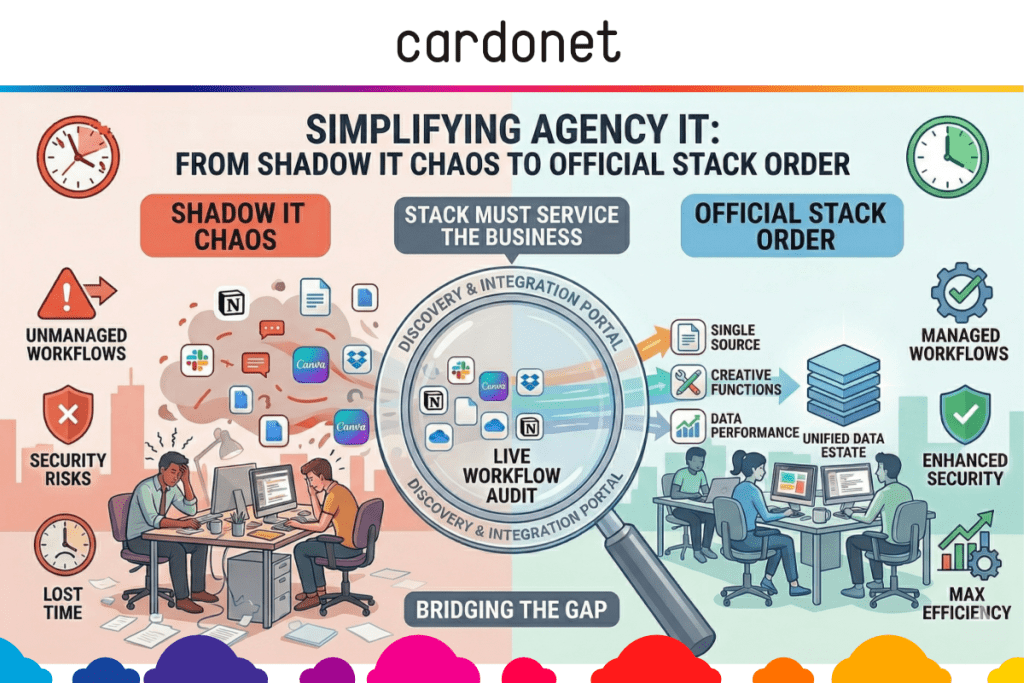
In fact, shadow IT is often a map of where the official stack has stopped serving the business. It tells you where systems are adding friction rather than removing it. This is useful information if you are willing to pay attention.
There is also a financial penalty to it. SaaS sprawl often means duplicate tools doing roughly the same job via multiple subscriptions owned by different departments. Even if the unofficial tools are helping your team move faster, the way they are being adopted may still be increasing cost and complexity in the background.
The more useful way to frame the issue is this: if the unofficial workflow is winning, it is because it feels more workable than the official one. That does not mean unofficial tools should be approved. Rather, the official stack needs to be fixed to earn back trust by being faster, clearer, and better aligned to how work actually happens.
Build a governed stack creatives will use
This is where agencies either improve or make things worse. A blanket crackdown may reduce visible tool sprawl for a while, but it usually just pushes the same behavior further underground. If people still need to hit deadlines, they will do what’s needed and simply stop telling you how they are doing it.
Instead, treat shadow IT as a live workflow audit. Map the tools teams actually use to get the work done and compare those to the tools in the procurement records.
From there, work through a practical five‑step sequence:
- Discover actual usage. Pull together expense records, SSO data, browser extension visibility, and team interviews to identify the true mix of apps supporting delivery. Security leaders consistently stress that if you cannot see the tools people are using, you cannot protect the data flowing through them, which is why automated discovery of shadow SaaS should be a prerequisite for any serious governance effort.
- Group by job‑to‑be‑done. Sort tools into communication, file sharing, briefing, project tracking, review, approvals, design, and reporting so you can see where duplication and friction cluster.
- Find the failure point(s). Why did the unofficial tool “win”. Was it speed, flexibility, remote access, freelancer access, better interface design, or less process overhead?
- Standardize where it matters… Some functions need a single source of truth – especially file storage, permissions, approvals, and offboarding.
- … but allow controlled flexibility where it helps. Early‑stage ideation or lightweight campaign planning may support a small, approved toolset rather than one rigid system, provided output lands in the right place later.
That last point matters. Build structure where this will protect the business and be flexible where it will genuinely improve the work. Good governance is not automatically about maximum restriction.
For many agencies, this is where specialist support becomes valuable. Our media and creative IT solutions are built around the real workflow of studios – Mac‑heavy environments, large files, mixed on‑site and remote teams – rather than generic enterprise assumptions. That is a more useful foundation than taking a standard corporate stack and hoping that your creatives will adapt to it.
What good creative IT governance looks like
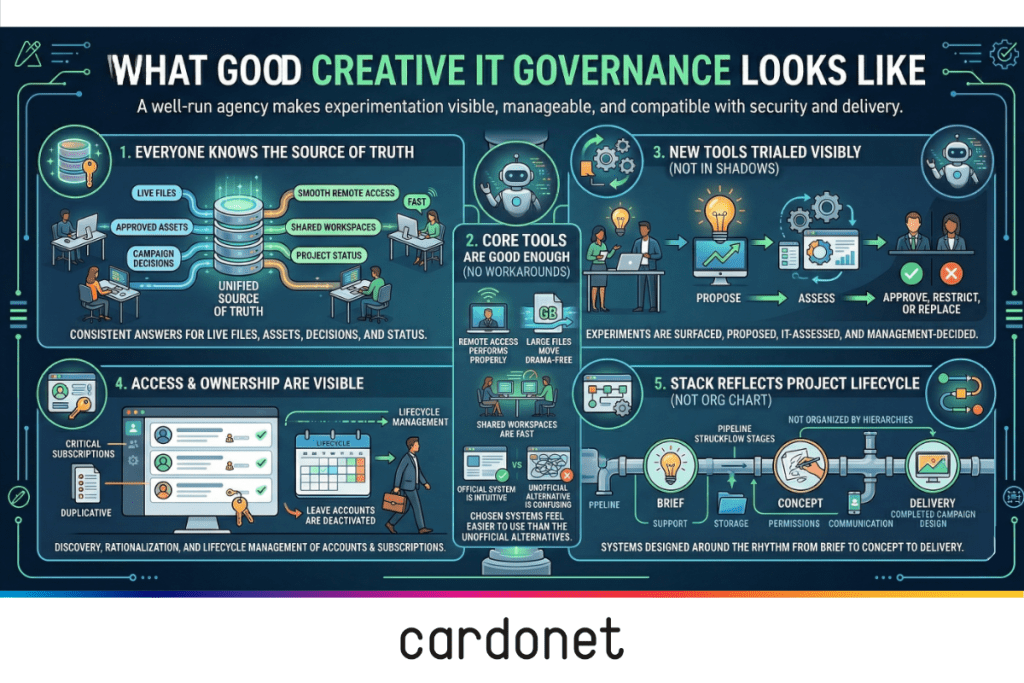
A well‑run agency does not eliminate experimentation. It makes experimentation visible, manageable, and compatible with security and delivery.
In practical terms, that usually means five things are true.
- Everyone knows the source of truth: If you ask where live files sit, where approved assets sit, where campaign decisions are logged, and where project status is tracked, you get consistent answers across the business.
- Core tools are good enough that people do not need constant workarounds: Remote access performs properly, large files move without drama, shared workspaces are fast, and the chosen systems feel easier to use than the unofficial alternatives.
- New tools can be trialed without disappearing into the shadows: Teams know how to propose something new, IT can assess it quickly, and leadership can decide whether to approve, restrict, or replace it. That creates a culture where useful experimentation is surfaced rather than hidden.
- Access and ownership are visible: You can see who has access to what, which subscriptions are business‑critical, which are duplicative, and what happens to accounts when staff or freelancers leave. SaaS management analyses repeatedly argue that this combination of discovery, rationalization, and lifecycle management is the only sustainable way to stop a growing application portfolio from turning into unmanaged shadow IT. That is where productivity and control start reinforcing each other rather than fighting each other.
- The agency’s stack reflects the project lifecycle, not the org chart: Support, storage, permissions, and communication are designed around the way work goes from brief to concept to delivery, because that is the rhythm your systems need to serve.
A simple shadow IT review
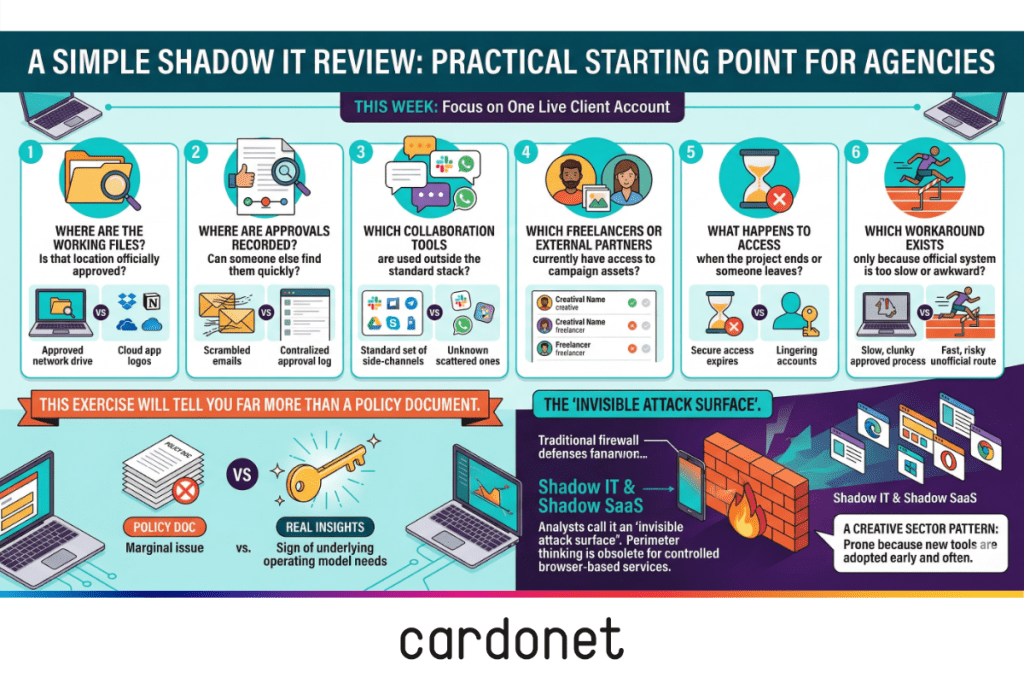
If you want a practical starting point, run this six‑question review across one live client account this week:
- Where are the working files, and is that location officially approved?
- Where are approvals recorded, and can somebody else find them quickly?
- Which collaboration tools are in use outside the standard stack?
- Which freelancers or external partners currently have access to campaign assets?
- What happens to access when the project ends or someone leaves?
- Which workaround exists only because the official system is too slow or awkward?
That exercise will tell you far more than a policy document. It will show you whether shadow IT in your agency is a marginal issue or a sign that the operating model underneath your tools needs attention.
If you find that every major account has its own ungoverned mix of tools, you are not alone. Analysts now describe shadow IT and shadow SaaS as an “invisible attack surface”, arguing that you cannot rely on traditional perimeter‑based thinking when so much of your work runs through browser‑based services you do not centrally control.
The creative sector is particularly prone to that pattern because it adopts new tools early and often.
Why this matters
Creative agencies are not judged by how tidy their internal tooling looks. They are judged by delivery, responsiveness, trust, and being able to do excellent work without unnecessary friction. When your stack helps that happen, productivity improves. When it gets in the way, people route around it.
Do not punish teams for being resourceful. It is far better to build an environment where resourcefulness does not require workarounds that fragment delivery and create avoidable chaos. Shadow IT is often the first visible sign that your operations need redesign not tighter policing.
The National Cyber Security Centre’s cloud guidance stresses that mis‑configured or ungoverned cloud services can undermine otherwise sound security controls – and shadow IT is, by definition, hard to configure and monitor properly. That is another reason to bring these tools into the light, even when your main concern is productivity rather than security.
FAQs
What is shadow IT in a creative agency?
Shadow IT in a creative agency is the use of apps, platforms, or workflows outside the approved tech stack to get work done, such as personal Dropbox accounts, side Slack workspaces, or Notion boards used for live client delivery. UK guidance describes these as “unknown assets” from IT’s perspective – still handling business data, but absent from normal asset management and control, which is why law‑firm summaries of NCSC thinking on shadow IT emphasize discovering those assets first.
Why do creative teams use unapproved tools?
Usually because the approved tools feel too slow, too rigid, or poorly matched to deadline‑led creative work. Teams adopt alternatives when they believe those alternatives help them move faster or collaborate more effectively, especially when existing systems were designed around office‑centric assumptions.
Is shadow IT always a security problem?
It is a security and governance issue, but often the first business impact is operational rather than technical – version confusion, fragmented files, duplicate subscriptions, and unclear ownership. SaaS governance commentary also points out that you cannot apply meaningful controls or monitoring to systems you do not know about, which is why shadow SaaS is now a core concern in cloud security discussions.
Should agencies ban tools like Dropbox, Canva, or Notion?
Not automatically. The better question is why those tools appeared, whether they solve a real workflow need, and whether they can be governed properly or replaced with something equally usable. A blanket ban without addressing the underlying friction usually just pushes the same behavior into even less visible corners.
How should a creative agency respond to SaaS sprawl?
Start by discovering what tools are really in use, group them by purpose, identify where the official stack is failing, standardise critical systems, and allow controlled flexibility where it genuinely improves delivery. Modern SaaS management guidance stresses ongoing discovery, rationalization, and lifecycle management – not a one‑off clean‑up – particularly in fast‑moving environments like creative agencies.

You must be logged in to post a comment.